
Open Source Network Monitoring Tools
Free tools for traffic visibility, with code you can read
Open source network monitoring gives you visibility into traffic, applications and threats without per-device licenses.
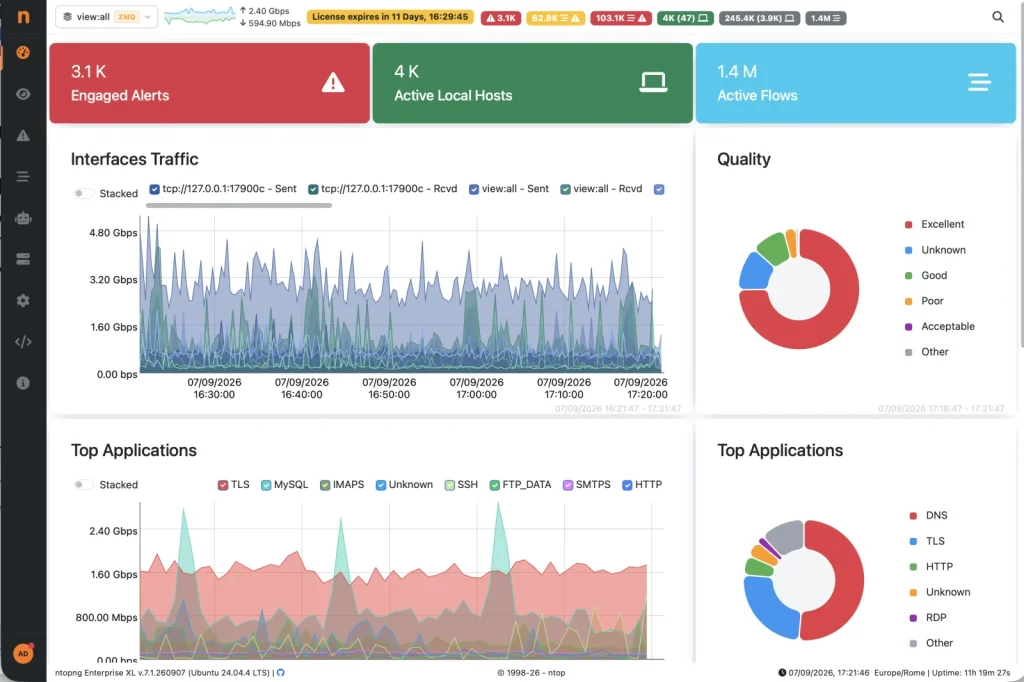
ntop has built open source network monitoring tools since 1998: ntopng for real-time traffic analysis, nDPI for deep packet inspection and PF_RING for high-speed packet capture.
first release
Layer-7 protocols
Community edition
Checklist
What to look for in an open source network monitoring tool
- Real-time visibility: who talks to whom, how much, and over which application.
- Application detection: knowing it is Microsoft Teams or BitTorrent, not just port 443.
- Multiple data sources: mirror port or TAP packets, NetFlow, sFlow, IPFIX, SNMP and firewall logs.
- Historical data: flows stored for investigations, not only live charts.
- Alerts: anomalies, suspicious behavior and performance issues raised automatically.
- A path to scale: from a lab or small office to high-speed links and many sites.
The stack
The ntop open source stack
ntopng Community
Web-based traffic analysis with hosts, flows, applications, ports and alerts.
nDPI
Identifies hundreds of Layer-7 protocols and extracts TLS metadata.
PF_RING
Accelerated packet capture for multi-gigabit links.
nProbe (commercial)
NetFlow, sFlow and IPFIX probe and collector that feeds ntopng.
Quick start
Start in three steps
- Install ntopng from the official packages on a Linux machine.
- Connect it to a mirror (SPAN) port or TAP, or point your routers’ flow exports to it.
- Open the web interface (current packages use HTTPS on port 3001, older versions use HTTP on port 3000) and explore hosts, flows, applications and alerts. The quickstart has every command and the ntopng user guide covers configuration and use cases.
How to choose
Open source network monitoring tools: which one for what?
| Your question | Type of tool | Examples |
|---|---|---|
| Is my router, server or service up? | Availability and SNMP monitoring | Zabbix, Nagios, LibreNMS, Prometheus |
| Who uses my bandwidth, and for what? | Traffic and flow analysis | ntopng, with nProbe for NetFlow and sFlow |
| What is inside this connection? | Packet analyzer | Wireshark, tcpdump |
| Is someone attacking my network? | Intrusion detection | Suricata, Zeek |
Most networks use one tool of each kind. ntopng answers the traffic questions and works next to the others.
Your setup
Open source network monitoring for your case
On Linux
ntopng runs on Ubuntu, Debian, Rocky Linux and other Linux systems. Follow the install quickstart.
On Windows
There is a Windows installer for ntopng. Install the Npcap driver first. See the quickstart for the steps.
On a Raspberry Pi
ntopng works on a Raspberry Pi and makes a quiet, low power network monitor. See monitor your home network.
For a home network
Use ntopng Community on a Raspberry Pi or a mini PC and give it a copy of your traffic. The home network guide shows how.
Self-hosted, on your own server
ntopng runs on your own infrastructure and your traffic data stays with you. It also runs in Docker.
Network traffic analyzer for a company
Add nProbe for NetFlow and sFlow from your routers, n2disk to record packets and the Pro or Enterprise editions for scale. See pricing.
Going further
When to go beyond the Community edition
Pro and Enterprise editions add features such as advanced reports, more integrations, historical flow storage with ClickHouse, and scalability to larger networks. Compare them on the pricing page. For flow collection from routers add nProbe. For packet archives add n2disk.
FAQ
Frequently Asked Questions
Is there a free, open source network monitoring tool from ntop?
Yes. The ntopng Community edition is open source and free, nDPI is released under the LGPL and PF_RING is open source. Pro and Enterprise editions of ntopng and commercial products such as nProbe add scale, flow collection and support.
What can I monitor with ntopng Community?
Hosts, flows, applications, ports, interfaces and alerts in real time on traffic from a mirror port or TAP, with Layer-7 detection provided by nDPI.
Which operating systems does ntopng run on?
ntopng is portable and runs on Linux, FreeBSD, macOS and Windows. See the installation page for packages.
Do I need agents on every device?
No. ntopng is agentless. It analyzes mirrored traffic, flows exported by routers and switches, SNMP data and firewall logs.
What is the best open source network monitoring tool?
It depends on the question. Zabbix, Nagios and LibreNMS check that devices are up. ntopng shows who uses the bandwidth and which applications run. Wireshark inspects packets. Suricata and Zeek detect intrusions.
Is there a free network traffic analyzer?
Yes. ntopng Community is a free and open source network traffic analyzer.
Can I monitor my home network for free?
Yes. Run ntopng Community on a Raspberry Pi or a small PC and give it a copy of your traffic.
Get started
Try ntopng on your network
Download the free Community edition, compare editions and buy in the shop, or talk to the ntop team about your requirements.