
Managing disk space is an important part of operating ntopng, especially in environments that collect large volumes of network traffic data. ntopng always allowed you to configure data retention in days, which provides a convenient way to control how long historical data is kept. However the actual disk space consumed by that data can vary significantly depending on traffic volume and monitoring activity, and in some case this led to instances filling up all the disk due to a miscalculation or unexpected traffic levels.
To make storage management easier and more predictable, ntopng now supports configuring a maximum disk space limit for its ClickHouse database.
Set a Maximum Disk Space for Historical Data
In addition to the existing retention policy based on the number of days, a new preference is available in the ntopng user interface: Flows/Alerts Max Disk Space.
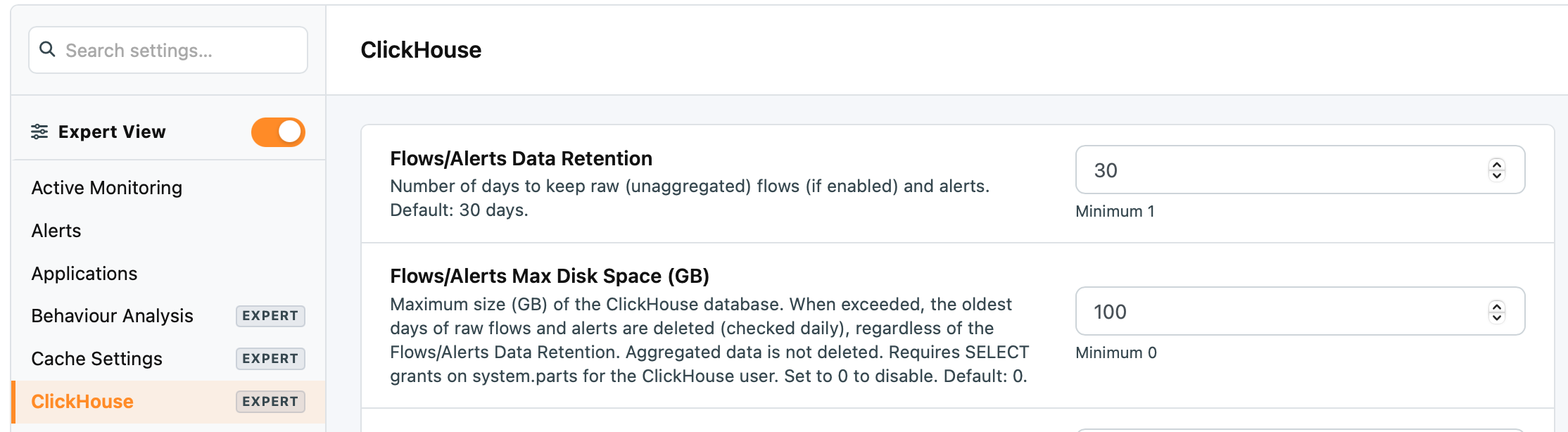
This preference defines the maximum size, in Gigabytes, of the ClickHouse database used by ntopng. When the configured limit is exceeded, ntopng automatically deletes the oldest days of raw flows and alerts to reduce storage usage.
The cleanup is checked once per day, and the size-based retention policy operates independently of the existing retention period. This means that when the disk space limit is exceeded, older raw data can be removed even if it has not yet reached the configured retention age.
How Does It Work?
The new preference complements the existing Flows/Alerts Data Retention setting, which specifies the number of days to keep raw flows, when enabled, and alerts.
The two preferences address different storage management needs:
- Retention by days: Defines how long raw flows and alerts should be retained.
- Retention by disk space: Defines the maximum ClickHouse database size and triggers the deletion of the oldest days of raw flows and alerts when the limit is exceeded.
For example, an installation retaining data for 30 days may consume significantly more disk space during periods of high network activity than during quieter periods. By configuring a maximum disk space, administrators can add a storage safeguard that helps prevent historical data from consuming more space than intended, or worst case fill up the whole disk, interrupting any activity running on the system.
Hint: configure retention by days to control how far back your data goes, and configure retention by disk space to help keep database storage under control.
Enjoy !