
NetFlow, sFlow & IPFIX Collection and Analytics
Collect and Analyze NetFlow, IPFIX, and sFlow for Reporting and Troubleshooting
Flow data is the most efficient way to monitor large or distributed networks, it captures who’s talking to whom, how much data moved, and what application was involved, without needing to inspect every packet. ntopng and nProbe turn NetFlow, IPFIX, and sFlow exports from your existing routers, switches, and firewalls into actionable, application-aware analytics.
The Problem
Flow Data Without Context Is Just Numbers
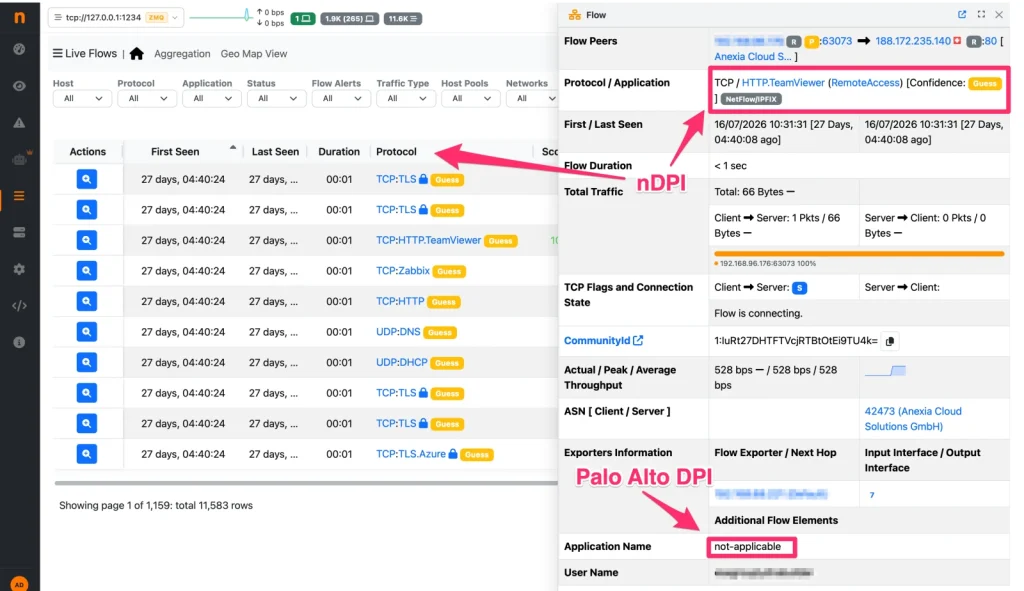
Most routers and switches can already export flow data, but raw flow records rarely tell the full story:
- Standard flow exports identify traffic by port and protocol, missing what application is actually generating it.
- Flow data from dozens of exporters across a network is hard to collect, normalize, and analyze centrally.
- Reporting on bandwidth trends, top talkers, or usage-based billing is manual and time-consuming without the right tooling.
The Solution
Flow Collection, Enrichment, and Analysis
- Universal flow collection (nProbe): collect NetFlow v5/v9, IPFIX, sFlow, and other flow formats from any exporter, routers, switches, firewalls, into a single pipeline.
- Application-layer enrichment (nDPI): nProbe enriches raw flow records with Layer 7 application metadata before they even reach your analytics console, so "port 443" becomes a named application, not a guess.
- Centralized analytics (ntopng): turn enriched flow data into real-time dashboards and historical reports: top talkers, bandwidth trends, application usage, and conversation-level detail.
- Flexible export formats: forward enriched flow data as NetFlow, IPFIX, or JSON to third-party analytics platforms, SIEMs, or billing systems already in your stack.
- Scale to any network size: from a single exporter to distributed, multi-gigabit networks, collect and analyze flow data with nProbe Cento handling 100+ Gbps environments.

Use Cases
Consolidating flow data from multiple vendors
A network with routers and firewalls from different vendors exports NetFlow, sFlow, and IPFIX in mixed formats. nProbe collects and normalizes all of it into a single analytics pipeline in ntopng.
Enriching flow data for security tooling
A SOC needs more than five-tuple flow records to investigate incidents effectively. nProbe enriches exports with application and metadata context before forwarding to the SIEM.
Usage-based reporting and billing
A service provider needs accurate, per-customer bandwidth reporting. Flow-based analytics in ntopng provide the granular usage data needed for billing and capacity reporting, without deploying full packet capture.
Troubleshooting without full packet mirrors
A remote site has no infrastructure for traffic mirroring. Flow export from the existing router, collected and analyzed with nProbe and ntopng, still gives the visibility needed to troubleshoot performance issues.
Long-term bandwidth trend reporting
Historical flow analytics reveal usage growth over months or years, supporting infrastructure budgeting and capacity planning conversations with concrete data.
Why it matters
Why Teams Use ntopng and nProbe for Flow Analytics
- Works with what you already have: no need to replace existing NetFlow/sFlow-capable routers and switches.
- Adds application context: nDPI enrichment turns raw flow records into meaningful, actionable data.
- Consolidates multi-vendor environments: one pipeline for flow data from any source.
- Scales from one office to global networks: with nProbe Cento for high-throughput environments.
Get started
Products you need
ntopng
Traffic Analysis Console
nProbe
Flow Exporter & Collector
nProbe Cento
High-Performance Flow Probe
nDPI
Deep Packet Inspection
Get started
Ready to see it on your network?
Download the free Community edition, compare editions and buy in the shop, or talk to the ntop team about your requirements.