
ntopng

High-Speed Web-based Traffic Analysis and Flow Collection
Layer-7 protocols
years of experience
editions, Community is free
The recommendation
Who should choose ntopng
ntopng is for network and security teams that want one web interface for real-time and historical traffic visibility. It reads packets from a mirror port or TAP, flows from NetFlow and sFlow exporters (through nProbe), SNMP devices, firewall logs and IDS events. Choose it when you want to see who talks to whom, with which application, and how well, without stitching several tools together.
- You need live and historical views of hosts, flows, applications, ASes and countries.
- You want alerts and behavioral checks, plus SNMP, active monitoring and SLA reporting in the same tool.
- You want to start free: the Community edition is open source (GPLv3), Pro and Enterprise add features and capacity.
The ideal use case
Ideal use case for ntopng
- Environment: enterprise or service provider networks, from a small office to large uplinks. Runs on Linux, FreeBSD, Windows x64, macOS and Raspberry Pi OS.
- Team: network administrators and security operations that read dashboards daily and integrate through the REST API.
- Technical requirements: a mirror port or TAP, or flow exporters feeding nProbe. Small networks need 2 cores and 2 GB RAM, 10 Gbps and above need 8+ cores and 16+ GB.
- Problem solved: find top talkers, latency, TCP retransmissions, VoIP quality and suspicious behavior, then keep the history for reports and post-mortem analysis.
Ideal for Every Environment
Deployment scenarios
Flow Collection in Enterprise Networks
Monitor hundreds of thousands of hosts with zero‑delay traffic analysis on high‑speed uplinks.
Flow collection requires ntopng to be used in conjunction with nProbe which can act as probe/proxy.
The communication between nProbe and ntopng takes place over ZeroMQ, a publish-subscribe protocol that allows ntopng to communicate with nProbe.
A remote nProbe is physically monitoring a mirror from a NIC and sending monitored flows to ntopng, or is collecting NetFlow v5/v9/IPFIX or sFlow from one or more exporters (routers or switches). nProbe Cento allows you to monitor even 100 Gbit links when processing packets from a mirror port, yet providing application protocol information by running nDPI.
Capture Packets from a Mirror/TAP
Mirror (SPAN) ports or TAP devices allow network monitoring tools to observe all packets flowing through the network for for network visibility, troubleshooting, threat detection, and capacity planning, without generating traffic or altering the data path.
- Mirror Port (SPAN): available on most managed switches, duplicates traffic from selected ports or VLANs to a dedicated monitoring port.
- TAP Device: transparently copies all network traffic at the physical layer, acting as a bump-in-the-wire and providing a fail-safe method for capturing traffic.
A physical NIC card connected to a mirror can be monitored by ntopng itself by simply specifying its interface name. This configuration can be used to monitor a mirror port from a switch, or in conjunction with a TAP device by aggregating two directions from two network interfaces. Alternatively, it is possible to use ntopng in combination with nProbe or nProbe Cento to scale up to 100 Gbit.
IDS Integration and Security Operations
Combine L7 visibility, IDS integration, syslog ingestion and alerts for full awareness. ntopng, in addition to behavioral checks able to detect traffic anomalies, can ingest events from IDS systems like Suricata enriching traffic analytics with security insights for faster threat detection and response.
The alternatives
ntopng alternatives, compared
Same criteria for each option: role, when to choose it, limits and cost.
ntopng with nProbe
- Role: Flow collection from routers and switches (NetFlow v5/v9/IPFIX, sFlow) over ZeroMQ.
- Choose it when: You have many exporters or remote sites and no packet access.
- Limits: Flows carry less detail than packets. One more component to run.
- Cost: nProbe Pro 299.95 euro, Enterprise S from 499.95 euro.
ntopng with nProbe Cento
- Role: Packet analysis of 1, 10, 40 and 100 Gbit links, classified with nDPI.
- Choose it when: You monitor links up to 100 Gbit from a mirror port.
- Limits: Needs capable hardware; ntopng alone captures with libpcap or PF_RING.
- Cost: Cento from 499.95 euro.
ntopng Community, Pro and Enterprise
- Role: Same product, three editions.
- Choose it when: Community for home and practitioners, Pro for offices and small enterprises, Enterprise for large organisations and ISPs.
- Limits: Community is for small networks; historical data and reports, extended SNMP and identity management are Enterprise features.
- Cost: Community free, Pro 299.95 euro, Enterprise M 699.95 euro, L 899.95 euro, XL 1,499.95 euro.
The tradeoffs
When ntopng is not the right choice
- ntopng is not a packet recorder. To keep full packets for forensics, add n2disk.
- It does not collect NetFlow or sFlow alone: add nProbe as probe and proxy.
- It detects and alerts. For inline policy enforcement see nEdge.
- Large networks (10 Gbps and above) need 8+ cores and 16+ GB RAM, and the Enterprise edition for historical data and reports.
The proof
Specifications, versions, pricing and documentation
Features, supported platforms and protocols, editions with prices, documentation links and answers to common questions follow below.
at a glance
Key Features
- Realtime network traffic, active flows and hosts
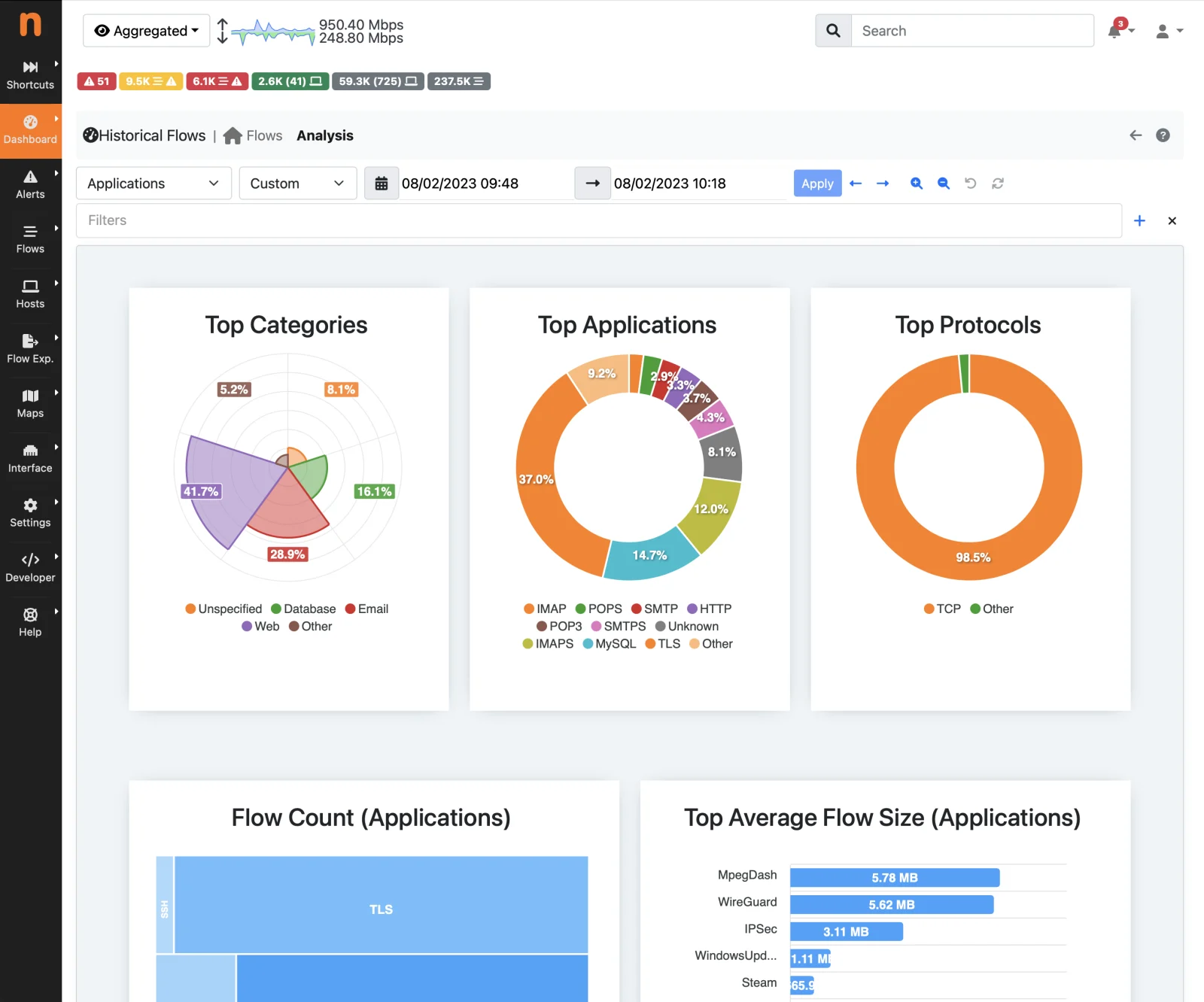
- Top talkers, AS, L7 application protocols, categories
- Protocol and application detection powered by nDPI
- Custom reports on historical data with metrics and trends
- Application latencies, Round Trip Time (RTT), throughput
- TCP metrics including retransmissions, out of order, packet loss
- Multimedia and VoIP metrics including jitter, MOS
- Hosts geolocalisation
- Multi‑interface support: mirror, TAP, flow collection
- Packet capture via libpcap and PF_RING
- Flow collection from nProbe, NetFlow and sFlow exporters
- HTML5 web user interface
- REST API to ease integrations with third-parties
- Full Layer-2 support and statistics
- Tunnel decapsulation including GTP andGRE
- Export to ElasticSearch and bigdata systems
- Interactive exploration of historical data exported (ClickHouse)
- Behavioural checks and alert notifications
- SNMP v1/v2c/v3 support
- Identity Management and VPN correlation
- Native nTap support for remote capture on cloud, VMs, containers
- Active monitoring and SLA reporting
Works great with nProbe!
ntopng works even better in distributed networks or high-speed links when paired with nProbe or nProbe Cento!
Screenshots
Gallery
versions
Choose Your Version
Did you already install the software?
Select the ntopng version that fits your needs. Different versions unlock different features and capacity.
Check the comparison table for the features set about the various versions.
Community (Open Source)
- Reatime visibility and top talkers
- Layer-7 application detection
- Historical timeseries for hosts
- VLAN, OS, Country and AS stats
- Alerts and notifications
- Active monitoring and network discovery
- Designed for: home and network practitioners
- Network size: Small
Pro
- All Community features included
- Interfaces aggregation in a unified View
- LDAP authentication
- Exterprise-level alert notifications
- Extended behavioral checks and alerts
- Network matrix timeseries
- Designed for: offices and small enterprises
- Network size: Small/Medium
Enterprise M/L/XL/XXL
- All Pro features included
- Historical data and reports
- Extended SNMP support
- NetFlow/sFlow exporters statistics
- Identity management with VPNs
- Infrastructure monitoring
- Designed for: large organisations, HSPs, ISPs, ...
- Network size: Large
Specifications
Tech Specs
- Linux
- FreeBSD
- Windows x64 (including Windows 10/11)
- macOS
- RaspbianOS
- Web GUI available through any HTML5-ready browser
- HTTP-based RESTful API
- TLS/HTTPS support
- Lua scriptability
| Small Network | Medium Network | Large Network | |
| Traffic | 100 Mbps | 1 Gbps | 10 Gbps and above |
| Processor | 2 cores | 4 cores | 8+ cores |
| Memory | 2 GB | 4 GB | 16+ GB |
For further information please check the Hardware Sizing notes.
- Ethernet
- IPv4/IPv6
- TCP/UDP/ICMP
- GTP/GRE/MPLS/VXLAN
- DHCP/BOOTP/NetBIOS/DNS…
- 450+ Layer-7 application protocols supported by nDPI
ntopng Community is distributed under the GNU GPLv3 license. Professional and Enterprise versions are subject to the EULA terms as well.
FAQ
Frequently Asked Questions
How much does ntopng cost?
The Community edition is free. ntopng Pro costs 299.95 euro, Enterprise M 699.95 euro, Enterprise L 899.95 euro and Enterprise XL 1,499.95 euro. Licenses are perpetual and include one year of maintenance, updates and support. See the pricing page.
Is ntopng free?
The Community edition of ntopng is free and open source under the GNU GPLv3 license. Professional and Enterprise editions are commercial, see the pricing page.
Which operating systems does ntopng support?
ntopng runs on Linux, FreeBSD, Windows x64 (including Windows 10 and 11), macOS and Raspberry Pi OS.
Do I need nProbe to use ntopng?
No. ntopng captures traffic from mirror ports and TAPs with libpcap or PF_RING. To collect NetFlow and sFlow from routers and switches, use nProbe as probe and proxy.
How does ntopng know the application behind a flow?
ntopng uses nDPI, the ntop deep packet inspection library, to detect hundreds of Layer-7 protocols, including encrypted traffic.
Related
Keep exploring
Pricing and editions
Compare editions and ways to buy.
Solutions
By use case and industry.
User guide
Installation and configuration.
Quickstart guide
Install and configure it step by step.
Get started
Ready to see it on your network?
Download the free Community edition, compare editions and buy in the shop, or talk to the ntop team about your requirements.