Preferences
Preferences menu entry enables the user to change runtime configurations. There are two types of settings (changeable by clicking the view at the end of the preferences menu) : Expert View and Simple View. The Expert View has all the configurable preferences, instead the Simple View only has the basic preferences.

Preferences List
A thorough help is reported below every preference directly into ntopng web GUI.
Change ntopng Index Page
It is possible to change the ntopng index page (e.g., instead of displaying the ‘Traffic Dashboard’ when opening ntopng, display the ‘SNMP’ page), by jumping to the ‘Settings’ and ‘Preferences’ tab. From here jump to the ‘User Interface’ section and modify the ‘Index Page’ with the ntopng page desired to be displayed as an index.
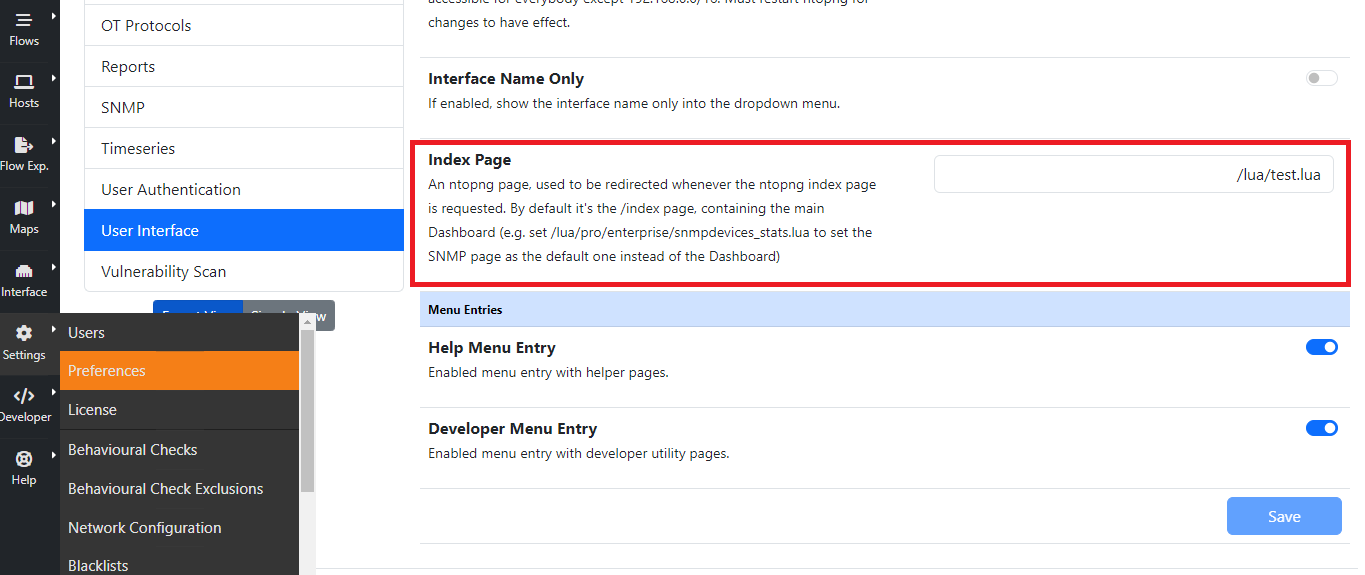
For instance, by setting the ‘Index Page’ to ‘/lua/pro/enterprise/snmpdevices_stats.lua’, when opening ntopng, the default page displayed is going to be the ‘SNMP’ one.
Data Retention
Data retention is configurable from the preferences.

Data Retention Configuration
Data retention is expressed in days and it affects:
Top Talkers stored in sqlite
Timeseries
Historical flows
Note
When using RRDs for timeseries, changing the data retention only affects new RRDs created after the change.
User Authentication
Authentication settings have moved to the dedicated User Authentication page.